.svg)


.webp)
.webp)
.png)
.png)


.png)


.png)

.png)

.png)


Recent Posts
.jpg)
.jpg)


.jpg)
Categories
Tags
Table of content
SHARE THIS ARTICLE
Is this blog hitting the mark?
Contact Us
Table of Contents
- Key Takeaways
- What Is Accessibility Testing?
- Types of Accessibility Testing
- How to Perform Accessibility Testing?
- Accessibility Standards and Compliance
- Automated Accessibility Tools vs Accessibility Experts
- When to Choose an Accessibility Testing Partner?
- Final Thoughts
- FAQs
Accessibility is often treated as a checklist item.
In reality, it is a growing risk, a usability gap, and a missed business opportunity.
An estimated 1.3 billion people globally, nearly 16% of the population, live with some form of disability.
At the same time, most digital products still fail to meet basic accessibility standards. Studies of top websites show that over 94% of pages contain WCAG accessibility failures.
The risk is not just usability. It is also legal.
In 2025 alone, over 5,000 digital accessibility lawsuits were filed, with numbers continuing to grow year over year.
In fact, lawsuits increased by 37% in just the first half of 2025, highlighting how quickly enforcement is accelerating.
Accessibility is no longer optional.
It directly impacts user experience, product reach, and compliance readiness. Organizations that ignore accessibility are not only excluding users but also exposing themselves to legal and financial risk.
Accessibility testing ensures that digital products can be used by everyone, including people with visual, auditory, motor, and cognitive disabilities. It validates how applications behave with assistive technologies such as screen readers, keyboard navigation, and voice interfaces.
However, accessibility testing is not just about automated scans.
Automated tools detect only a portion of issues, while real usability barriers require manual validation, assistive technology testing, and user-level evaluation.
From a quality perspective, accessibility is not a one-time activity. It is a continuous practice that needs to be integrated into development, testing, and release workflows.
Key Takeaways
- Accessibility testing is not just compliance, it directly impacts usability and product quality
- Automated tools can detect issues quickly, but they cover only a portion of real accessibility gaps
- Manual testing and assistive technology validation are essential for evaluating real user experience
- A hybrid approach combining automation and human validation ensures both speed and accuracy
- Accessibility must be tested across complete user journeys, not just individual screens
- Standards like WCAG, ADA, and regional guidelines define structure, but usability defines success
- Accessibility testing should be integrated into development workflows, not treated as a one-time audit
- Partnering with accessibility testing experts helps ensure compliance, reduce risk, and improve overall product quality
What Is Accessibility Testing?
Accessibility testing ensures that digital products can be used by people with disabilities. It validates whether websites, mobile applications, and digital platforms are accessible across different interaction methods and assistive technologies.
The goal is not just compliance. It is to ensure that users can navigate, understand, and interact with a product without barriers, regardless of how they access it.
Accessibility testing shifts the focus from “does it work” to “does it work for everyone”.
Related Read: Best Practices in Accessibility Testing
Who gets benefited with Accessibility Testing?
Accessibility testing covers a wide range of users with different needs and interaction patterns.
- Visual impairments
- Hearing impairments
- Motor disabilities
- Cognitive limitations
Each category interacts with digital systems differently. For example, a visually impaired user may rely entirely on a screen reader, while a user with motor limitations may depend on keyboard navigation instead of touch or mouse input.
This diversity makes accessibility testing a multi-dimensional activity rather than a single validation step.
What Accessibility Testing Actually Evaluates?
Accessibility testing goes beyond checking UI elements. It evaluates how information is structured, presented, and interacted with.
- Content readability and clarity
- Logical navigation flow
- Consistency across screens
- Accessibility of dynamic elements
- Error handling and feedback
For example, a form may look correct visually, but if error messages are not announced to screen readers or fields are not properly labeled, the experience breaks for assistive users.
Assistive Technologies and Real Usage Simulation
Accessibility testing involves validating real user interactions using assistive technologies.
- Screen readers such as JAWS, NVDA, VoiceOver
- Keyboard-only navigation
- Voice interaction tools
- Screen magnification tools
These tools simulate how users interact with digital products in real scenarios. Testing with them helps identify issues that cannot be detected through code or visual inspection alone.
Accessibility Testing vs Traditional Testing
Traditional testing validates functionality and performance. Accessibility testing validates usability under constraints.
- Traditional testing checks if features work
- Accessibility testing checks if users can access those features
A feature can pass all functional tests and still be unusable for a segment of users. Accessibility testing ensures inclusivity in real usage, not just correctness in execution.
Accessibility as a Quality Indicator
From a quality perspective, accessibility testing often uncovers deeper product issues.
- Poor information architecture
- Inconsistent navigation patterns
- Unclear content hierarchy
- Usability friction points
These are not just accessibility problems. They are product quality issues that impact all users.
Teams that invest in accessibility testing often see improvements in overall usability, not just compliance metrics.
Accessibility Is a Continuous Practice
Accessibility cannot be validated once and considered complete.
Modern applications evolve continuously, which means accessibility must evolve with them.
- New features introduce new accessibility risks
- UI updates can break existing accessibility flows
- Dynamic content can impact assistive technology behavior
This makes accessibility testing an ongoing process integrated into development and release cycles.
From a quality intelligence perspective, accessibility testing helps teams move beyond surface-level validation and understand how their product performs in real-world usage conditions across diverse users.
Related Read: 5 Signs you Need QA Consulting
Types of Accessibility Testing
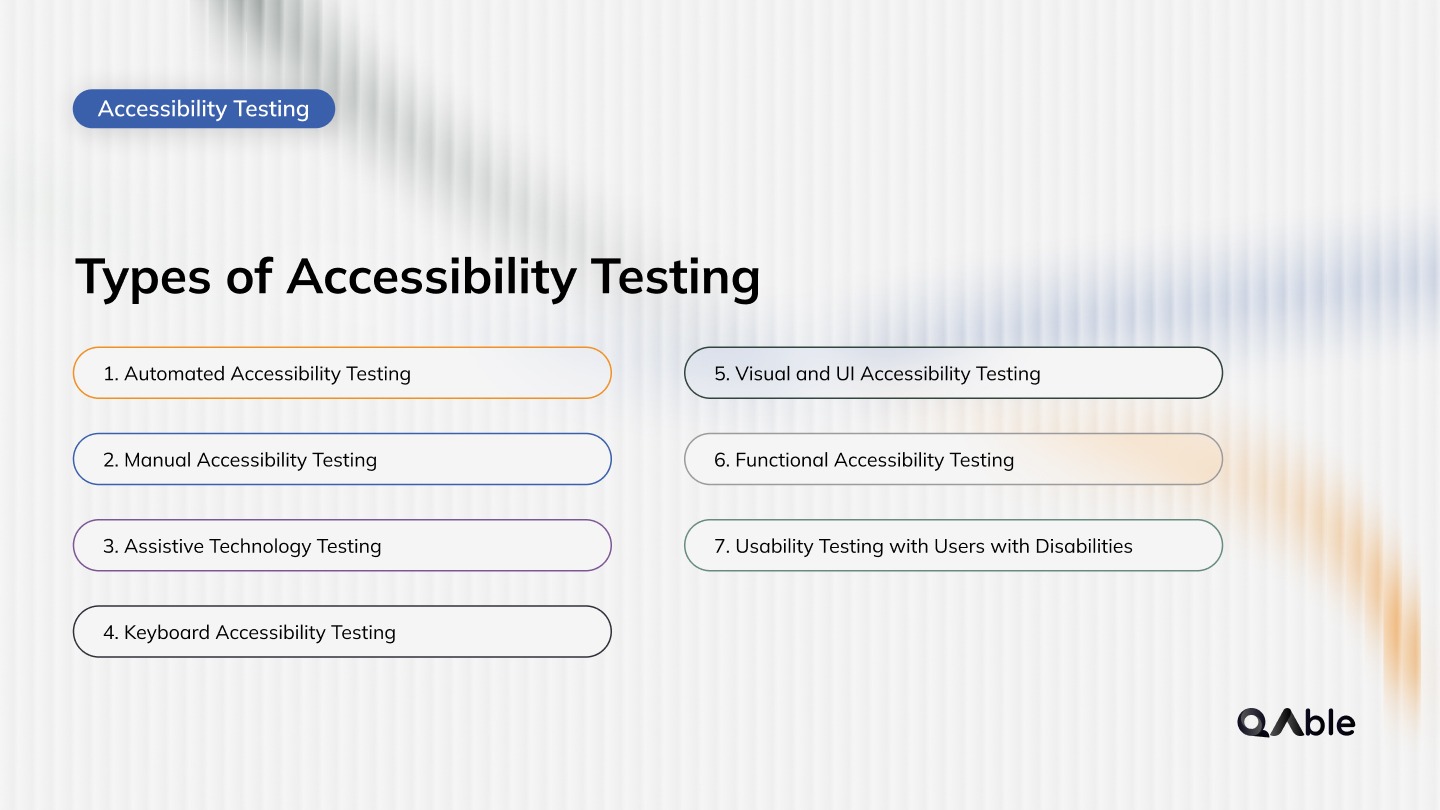
Accessibility testing is not a single activity. It spans multiple validation layers depending on how users interact with a product and what barriers may exist across different interfaces.
Most modern applications require a combination of testing approaches to ensure true accessibility, not just surface-level compliance.
1. Automated Accessibility Testing
Automated testing uses tools to scan digital products for common accessibility violations.
- Missing alt text
- Color contrast issues
- Incorrect heading structure
- Missing form labels
- ARIA attribute misuse
Automated tools are fast and scalable, making them useful for early detection and continuous monitoring.
However, they typically identify only 30–40% of accessibility issues, as they cannot evaluate usability, context, or real user experience.
2. Manual Accessibility Testing
Manual testing involves human evaluation of accessibility across real user flows.
- Screen reader navigation
- Keyboard-only interaction
- Logical reading order
- Focus management
- Dynamic UI behavior
This type of testing identifies issues that automated tools cannot detect, especially those related to usability and interaction patterns.
Manual testing is essential for validating real accessibility, not just technical compliance.
3. Assistive Technology Testing
This type of testing validates how applications behave with assistive tools used by people with disabilities.
- JAWS and NVDA (screen readers)
- VoiceOver (iOS/macOS)
- TalkBack (Android)
- Magnification tools
Testing with these tools ensures that content is correctly announced, navigation is logical, and interactions are usable in real scenarios.
4. Keyboard Accessibility Testing
Keyboard testing ensures that users can interact with the application without a mouse.
- Tab navigation flow
- Focus visibility
- Skip navigation links
- Interaction with forms and menus
This is critical for users with motor disabilities and is also a strong indicator of overall accessibility quality.
5. Visual and UI Accessibility Testing
This focuses on how content is presented visually and whether it is readable and understandable.
- Color contrast compliance
- Text readability
- Scalable fonts
- Layout consistency
Poor visual accessibility can make content unusable even if the functionality works correctly.
6. Functional Accessibility Testing
This ensures that all features of the application are accessible, not just static content.
- Form submissions
- Authentication flows
- Navigation between pages
- Error handling
It validates whether users with disabilities can complete key workflows successfully.
7. Usability Testing with Users with Disabilities
This is one of the most valuable but often overlooked types of testing.
- Real user interaction feedback
- Navigation challenges
- Comprehension issues
- Usability friction points
It provides real-world insights that cannot be replicated through tools or internal testing alone.
Summary
No single type of accessibility testing is sufficient on its own.
Automated testing provides speed, manual testing provides depth, and assistive technology testing provides real-world validation. Together, they form a complete accessibility testing strategy.
From a quality perspective, combining these approaches ensures that accessibility is not just checked, but truly experienced.
Related Read: Top 10 Accessibility Testing Tools in 2026
How to Perform Accessibility Testing?

Accessibility testing is most effective when it combines automation with human validation. Automated tools provide speed and coverage, while manual testing ensures real usability and accuracy.
A structured workflow helps teams balance both.
1. Define Accessibility Scope
Start by identifying what needs to be tested across the product.
- Critical user journeys
- High-traffic pages
- Web and mobile platforms
- Documents such as PDFs
This ensures testing focuses on real user impact, not just surface-level coverage.
2. Align with Accessibility Standards
Set clear compliance benchmarks before testing begins.
- WCAG 2.1 or latest version
- ADA and Section 508
- Regional accessibility guidelines
This defines what “accessible” means for your product.
3. Run Automated Accessibility Scans
Automation acts as the first layer of validation.
- Detect structural issues
- Identify missing attributes
- Flag contrast and labeling errors
- Scan large volumes quickly
This step helps catch common issues early and reduces manual effort.
4. Filter and Prioritize Findings
Not all automated issues require immediate action.
- Remove false positives
- Group similar issues
- Prioritize based on severity and impact
This ensures teams focus on meaningful accessibility gaps.
5. Perform Manual Accessibility Testing
Manual testing validates real user experience.
- Screen reader navigation
- Keyboard-only interaction
- Reading order validation
- Focus management
This step identifies usability issues that automation cannot detect.
6. Validate with Assistive Technologies
Testing with real tools ensures practical accessibility.
- JAWS, NVDA, VoiceOver
- TalkBack for mobile
- Magnification tools
This confirms that the product works as expected for actual users.
7. Evaluate End-to-End User Flows
Accessibility should be validated across complete workflows.
- Login and authentication
- Form submissions
- Navigation flows
- Error handling
A feature is only accessible if users can complete tasks successfully.
8. Document Issues with Context
Each issue should include more than just a technical description.
- User impact explanation
- WCAG mapping
- Severity level
- Affected components
This helps teams understand why the issue matters, not just what is broken.
9. Provide Clear Remediation Guidance
Fixes should be actionable and specific.
- Code-level recommendations
- UI and design adjustments
- Content improvements
This reduces back-and-forth between QA and development teams.
10. Retest and Integrate into Workflow
Accessibility testing should be continuous.
- Validate fixes across tools
- Prevent regression issues
- Integrate scans into CI/CD
- Schedule periodic manual audits
This ensures accessibility remains consistent as the product evolves.
Summary
Accessibility testing is not effective when treated as only automation or only manual review. The real value comes from combining both.
Automation provides speed and scale. Human validation ensures accuracy and usability.
From a quality perspective, this hybrid approach helps teams deliver accessible experiences without slowing down development.
Accessibility Standards and Compliance

Accessibility testing is guided by global standards that define how digital products should be designed and evaluated for inclusivity.
These standards provide a structured way to ensure that applications are usable for people with disabilities across different environments and devices.
Compliance is not just about meeting regulations. It helps teams build consistent, measurable accessibility practices across products.
1. Web Content Accessibility Guidelines (WCAG)
WCAG is the most widely adopted accessibility standard globally. It provides detailed guidelines for making web and mobile content accessible.
WCAG is built on four core principles:
- Perceivable
- Operable
- Understandable
- Robust
These principles ensure that users can access content, interact with it, and understand it regardless of their abilities.
WCAG defines three levels of compliance:
- Level A - Basic accessibility
- Level AA - Industry standard
- Level AAA - Advanced accessibility
Most organizations aim for WCAG 2.1 or 2.2 Level AA, which balances usability and practicality.
2. ADA (Americans with Disabilities Act)
The ADA is a legal requirement in the United States that mandates equal access for individuals with disabilities.
While ADA does not define technical standards directly, it is commonly enforced using WCAG guidelines as a reference.
Organizations that fail to meet accessibility expectations under ADA may face:
- Legal complaints
- Financial penalties
- Reputational impact
This makes accessibility a compliance requirement, not just a best practice.
3. Section 508
Section 508 applies to US federal agencies and organizations that work with them.
It requires digital systems to be accessible and aligns closely with WCAG standards.
Key areas include:
- Accessible documents
- Software interfaces
- Web applications
Organizations working with government systems must ensure compliance with Section 508.
4. EN 301 549 (Europe)
This standard applies to digital accessibility requirements across the European Union. It is used for public sector websites, applications, and digital services.
EN 301 549 is aligned with WCAG and ensures accessibility across:
- Web platforms
- Mobile applications
- Digital documents
5. GIGW and IS Standards (India)
In India, accessibility is guided by frameworks such as:
- GIGW (Guidelines for Indian Government Websites)
- IS 17802 accessibility standards
These frameworks align with WCAG and define accessibility requirements for government and public-facing digital platforms.
6. Accessibility Compliance in Practice
Compliance is not limited to websites. It extends across all digital touchpoints.
- Websites and mobile apps
- User dashboards and portals
- Digital workflows such as e-KYC
- Documents such as PDFs and reports
Organizations must ensure accessibility across the entire user journey, not just individual pages.
7. Compliance Is a Continuous Responsibility
Accessibility compliance is not a one-time certification. It requires ongoing validation as systems evolve.
- New features introduce new risks
- UI updates can break accessibility
- Dynamic content impacts usability
Regular audits, testing, and monitoring are essential to maintain compliance over time.
Summary
Accessibility standards provide the foundation, but compliance alone does not guarantee usability.
From a quality perspective, the goal is not just to meet guidelines, but to ensure that users can interact with the product effectively in real-world conditions.
Teams that treat compliance as part of their development and testing lifecycle build more reliable and inclusive digital experiences.
Automated Accessibility Tools vs Accessibility Experts
Accessibility testing requires both speed and accuracy. Automated tools and accessibility experts serve different roles, and understanding their differences helps teams build a more effective testing strategy.
Automated tools help you find issues quickly. Accessibility experts help you understand and fix what actually matters.
From a quality perspective, tools improve efficiency, while experts ensure effectiveness. Combining both is what leads to truly accessible and usable products.
When to Choose an Accessibility Testing Partner?
Accessibility testing can start internally, but as products scale and compliance requirements grow, many organizations reach a point where external expertise becomes necessary.
Choosing an accessibility testing partner is not just about outsourcing testing. It is about bringing structured expertise, real user validation, and compliance confidence into your product lifecycle.
- Preparing for compliance audits
- Facing legal or regulatory risk
- Launching new products or major updates
- Complex applications with multiple workflows
- Lack of in-house accessibility expertise
How to Choose the Right Accessibility Testing Partner?
Choosing the right partner comes down to a few critical capabilities that directly impact quality and compliance.
- Standards expertise across WCAG, ADA, and regional regulations
- Hybrid testing approach combining automation and human validation
- Assistive technology testing using real tools like JAWS and VoiceOver
- Clear remediation guidance with actionable fixes
- Ability to support continuous testing within development workflows
Summary
A strong accessibility partner does not just identify issues. They help teams build a repeatable and scalable accessibility practice.
From a quality perspective, the right choice ensures accessibility becomes part of your product lifecycle, not a last-minute activity.
Final Thoughts
Accessibility testing is no longer a secondary concern. It is a core part of building reliable, usable, and compliant digital products.
Automated tools can help you move fast, and internal teams can cover foundational checks. But real accessibility comes from understanding how users interact with your product in real-world conditions.
As applications grow in complexity, accessibility also becomes harder to manage without a structured approach. Teams that treat accessibility as a continuous practice, rather than a one-time audit, are better positioned to avoid compliance risks and improve overall product quality.
At QAble, accessibility testing services are designed to go beyond surface-level checks. By combining automated scanning, manual validation, and assistive technology testing, the focus remains on delivering both compliance and real usability.
With a quality intelligence approach, accessibility is integrated into development workflows, enabling teams to identify issues early, reduce remediation effort, and maintain accessibility as the product evolves.
Accessibility is not just about meeting standards. It is about delivering products that work for everyone, consistently and at scale.
Discover More About QA Services
sales@qable.ioDelve deeper into the world of quality assurance (QA) services tailored to your industry needs. Have questions? We're here to listen and provide expert insights


Viral Patel
Co-Founder
Follow


Viral Patel is the Co-founder of QAble, delivering advanced test automation solutions with a focus on quality and speed. He specializes in modern frameworks like Playwright, Selenium, and Appium, helping teams accelerate testing and ensure flawless application performance.


.jpg)


.webp)

